Internal Link Examples: Real Cluster-to-Pillar Patterns That Build Authority
By Ben — Founder. Multiple years doing SEO for clients and my own businesses. I built Andy’s cluster-based content workflow by synthesizing Backlinko’s canonical SEO program with Reforge’s 2026 strategic framework, and I’ve implemented cluster-to-pillar internal linking across real domains.
An internal link example is a contextual hyperlink inside body copy that connects one page on your site to another. The highest-value pattern: a cluster article links back to its pillar page using descriptive anchor text that matches the pillar’s primary keyword. This signals to search engines that your content is organized around a topic, not just a collection of pages, which is how topical authority gets built in 2026.
You already know internal linking matters. The problem is showing a client or a writer what a good link actually looks like. Most examples online stop at “page A links to page B,” which tells nobody anything. This page is the reference you can bookmark and send to a writer before they start a brief, with real cluster-to-pillar patterns and the reasoning behind each placement.
What an internal link example actually shows you (beyond ‘link from A to B’)
There are two kinds of internal links, and they do different jobs. A navigational link sits in your header, footer, or sidebar. It is the same on every page and tells search engines about your site structure. A contextual link sits inside body copy, inside a sentence the reader is actually reading, and it tells search engines that two pieces of content are topically related.
That second type is the one that moves the needle. A contextual cluster-to-pillar link carries more weight because it appears in a relevant sentence, surrounded by relevant text, pointing to a relevant target. The surrounding words give the link meaning. A footer link to the same page has none of that context.
Here is the framing to carry through the rest of this page: an internal link is a hierarchy signal. When ten cluster articles all point back to one pillar with descriptive anchors, you tell Google which page is the parent and which are the children. That is how you think in clusters and content pillars, and it is the foundation of any real topical authority strategy. Navigation moves people. Contextual links move authority.
5 real internal link examples from top-ranking topical clusters
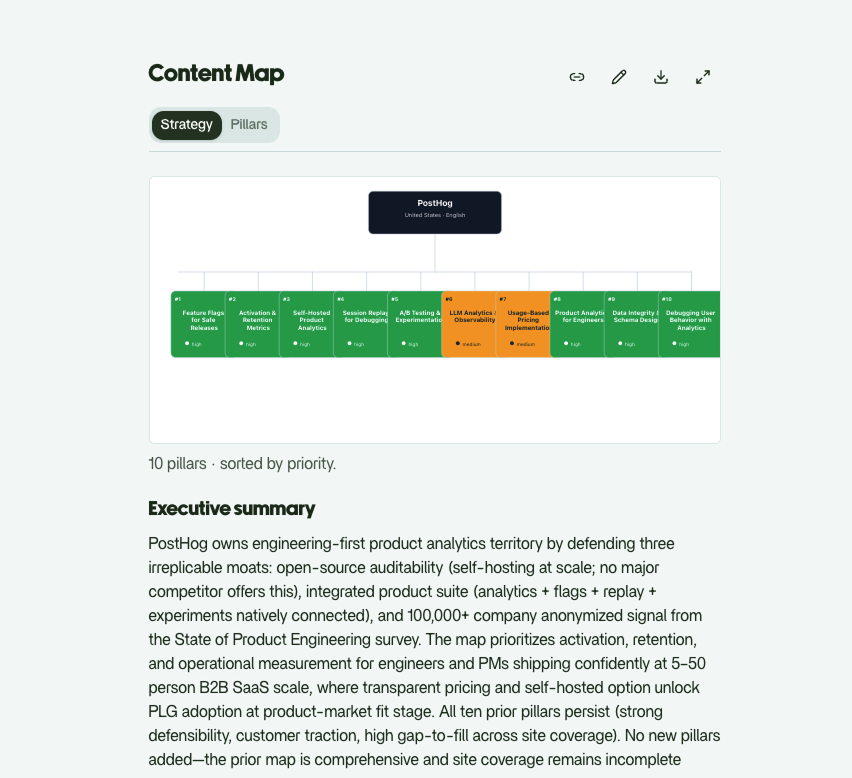
Every example below is a pattern I pulled from how top-ranking topical clusters are actually wired, the kind of structure that shows up when you run live SERP analysis on a competitive topic. For the architecture context behind these, see how topic clusters and pillar pages fit together.
1. Cluster article points up to the pillar with keyword-matched anchor text. Say your pillar targets “email marketing.” A cluster article on subject lines includes a sentence like: “Subject lines are one piece of a larger email marketing program.” The anchor matches the pillar’s primary keyword. One link, placed in the first relevant sentence. This is the workhorse pattern, and it’s the one writers get wrong most.
2. Pillar page points down to each cluster with descriptive section anchors. The pillar covers the whole topic at a high level, then links out to each cluster article from the section that summarizes it. A sentence in the deliverability section reads: “Most senders lose reach to email authentication errors.” The anchor describes the destination, not the section it lives in. The pillar becomes a hub. If you want the deeper mechanics, here is how internal linking clusters work in SEO.
3. Sibling clusters cross-link only when content is genuinely related. Your “subject lines” article and your “send times” article both live under the email pillar. They cross-link because a reader optimizing subject lines would plausibly want send-time data next. Your “subject lines” and “list segmentation” articles do not cross-link, because the topical jump is too wide. Cross-linking every sibling to every sibling is noise, and Google reads noise as noise.
4. Anchor text varies across multiple links to the same target. Three cluster articles point at the same pillar. One uses “email marketing,” one uses “an email marketing strategy,” one uses “building an email program.” Same destination, three natural variations. The links read like sentences a human wrote, not like a template stamped across the site.
5. Body-copy placement versus a “related reading” callout. A contextual link inside a paragraph carries the topical signal. A “related reading” callout at the end of the article is closer to navigation. Use the in-body link for the pillar relationship that matters most, and reserve the callout for a useful-but-secondary pointer. Don’t demote your most important link to a box at the bottom.
How to choose anchor text that signals topical authority
Anchor text is the label search engines read to understand what’s on the other side of the link. Get it right and you reinforce the topic. Get it wrong and you waste the link.
Start with the target page’s primary keyword as your baseline. If the pillar targets “internal linking strategy,” that phrase is your anchor for the most important link. Then vary it across the other links pointing to that same page. Exact-match repetition of the identical phrase on every link looks engineered, and a site that looks engineered gets read as one. This is the rule most writers skip.
Three rewrites I give to writers:
- Before: “To learn more about this, click here.” After: “This sits inside a broader internal linking strategy that ties your cluster together.” The anchor now carries the topic.
- Before: “We wrote about pillar pages here.” After: “Pillar pages work because of how topic clusters and pillar pages fit together.” The anchor describes the destination.
- Before: “Read our full guide here.” After: “The same logic drives anchor text for internal links across the whole cluster.” Specific, descriptive, keyword-relevant.
The pattern is simple. Kill “click here,” “read more,” and “learn more.” Those anchors carry no topical signal at all, and they cost you the one thing the link was supposed to deliver. Contextual cluster-to-pillar links with descriptive anchor text are the single highest-value internal linking pattern for building topical authority. Treat every anchor as a label you are handing to Google.
Where to place internal links inside a cluster article
Placement decides how much a link is worth. The first contextual mention of the target topic in your body copy is the highest-value spot. If a cluster article on subject lines mentions the broader email program in paragraph two, that is where the pillar link goes. Not paragraph nine.
Spread the rest across sections instead of front-loading them. An intro stuffed with five links reads like a directory and dilutes each one. Place a link where the surrounding sentence earns it, then move on. Each link should feel like it belongs to the idea in that paragraph.
Two rules I hold firm on. Link to the pillar page once per cluster article. A second link to the same pillar adds nothing and splits the signal. And cross-link to a sibling cluster only when the reader would genuinely want to go there next, never as a blanket rule applied across the site. Relevance is the whole game here.
Once these patterns are second nature, the next step is building a full internal linking strategy across the entire cluster, so every new article knows which pillar it reports to before a writer touches it.
This is the difference between random links and a structure. Writers add links where they remember to. A cluster architecture decides the links before the writing starts, which is exactly how Andy maps internal links inside Andy’s end-to-end SEO workflow: brand first, then pillars, then the briefs that tell every writer which link goes where. Do it this way and you signal to Google and to LLMs that you are an expert on the topic, not just a site with pages about it.
FAQ
What is a good example of an internal link?
A contextual link inside body copy that points from a cluster article to its pillar page, using anchor text that matches the pillar’s primary keyword. For example, an article on subject lines linking the phrase “email marketing” to the email marketing pillar. The link sits in a relevant sentence, not in a footer.
How do you link from a cluster article to a pillar page?
Place an in-body contextual link at the first point where the article references the broader topic. Use anchor text that matches the pillar’s primary keyword, and drop it into a sentence where it reads naturally. One link per cluster article is enough.
What anchor text should I use for internal links?
Use descriptive, keyword-relevant anchor text that matches the target page’s primary keyword. Skip “click here,” “read more,” and “learn more,” because they carry no topical signal. When several links point to the same page, vary the wording so it reads like natural writing.
How many internal links should a page have?
There is no hard rule. Three to five contextual links per cluster article is a practical baseline. Prioritize relevance over count: one well-placed link to the right pillar beats ten links scattered for the sake of a number.
What is the difference between a contextual link and a navigational link?
A contextual link lives in body copy and signals topical relevance between two pages. A navigational link lives in the header, footer, or sidebar and signals site structure only. Contextual links build topical authority. Navigational links help people find their way around.